
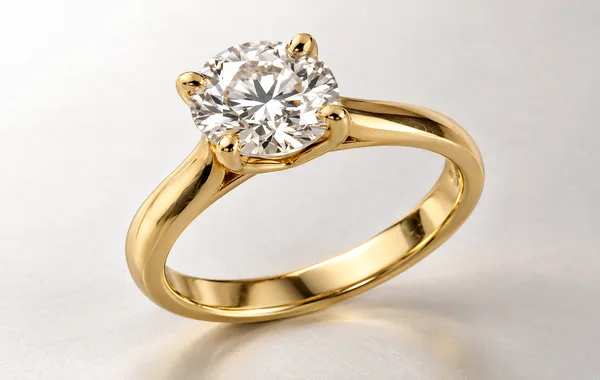
In commercial e-commerce photography, there is a dangerous line between professional digital enhancement and catastrophic over-retouching. When done correctly, post-production removes distracting studio dust, balances exposure, and presents a product in its most flattering, authentic light. But when pushed too far, over-retouching strips away the physical tactile identity of the material, turning full-grain Italian leather into synthetic vinyl, washed linen into stiff polyester, and brushed steel into yellowed plastic.
The commercial fallout of over-retouching is severe. When a customer receives a physical product that looks artificial, smoothed, or altered compared to the digital listing, buyer remorse triggers an immediate return. According to e-commerce industry benchmarks, over 20% of online apparel and luxury goods returns are attributed directly to product misrepresentation. Retouching should never deceive—it should elevate true craftsmanship.
This technical guide establishes an objective standard for commercial retouchers, studio directors, and brand managers, detailing exactly what physical imperfections must be removed versus what authentic material characteristics must remain untouched.
1. The Nonnegotiable Rule: Material Truthfulness
Every commercial product possesses an authentic material signature: the natural grain of cowhide, the woven slubs of organic linen, the directional micro-scratches of brushed titanium, or the crisp facet brilliance of a round diamond. Digital retouching must enhance the clean presentation of this signature—never overwrite it with flat computer-generated tones.
| Material Category | What MUST Be Cleaned & Corrected | What MUST Stay 100% Natural |
|---|---|---|
| Fine Leather & Suede | Handling scratches, glue residue, packing tape marks, edge scuffs. | Natural pebble grain, organic hide pores, natural stitch tension folds. |
| Apparel & Woven Textiles | Lint fibers, loose threads, packaging creases, fabric pills. | Authentic fabric weave (twill, rib, pique), natural body drape folds. |
| Polished Metals (Watches, Hardware) | Studio fingerprints, lint, sensor dust spots, micro-scuffs. | Authentic specular light falloff, directional brushed metal texture, chamfered bevels. |
| Glassware & Cosmetics | Airborne dust motes, smudges, interior manufacturing bubbles. | Natural light refraction, liquid meniscus curves, specular surface highlights. |
| Footwear & Sneakers | Excess sole glue, production scuffs, manufacturing seam flash. | Sole rubber grip texture, leather grain, natural fabric breathing mesh. |
2. What Must ALWAYS Be Removed in Post-Production
Certain imperfections are artifacts of the studio environment or handling, rather than the product itself. These must be systematically eliminated across every catalog master:
- Studio Contamination: Airborne dust settling on dark surfaces, camera sensor dust spots visible on white cycloramas, and handling fingerprints on glass or polished metal.
- Manufacturing Flaws (Non-Structural): Stray glue seepage along sneaker midsoles, loose hanging threads on apparel hems, and packaging tape adhesive residue.
- Studio Rigging Hardware: Clear acrylic risers, mounting putty, monofilament fishing wire used to suspend jewelry, and clamps used to dress mannequins.
- Optical Lens Artifacts: Chromatic aberration (purple or green fringing along high-contrast metal and glass borders) caused by studio strobe refraction through macro lenses.
3. What Must ALWAYS Remain Untouched
Amateur retouchers frequently mistake essential material features for flaws. Removing these details destroys commercial product credibility:
- Authentic Material Texture: Never apply Gaussian blur or heavy median filters to leather, wood, or textiles. Smoothing away leather grain makes luxury goods look cheap and counterfeit.
- Specular Highlight Form: Specular highlights are the bright glints of light that tell the human brain whether an object is curved, flat, glossy, or matte. Over-smoothing these reflections flattens three-dimensional depth.
- Structural Stitching & Seams: Never erase stitching holes or seam threads on garments or leather goods. Symmetrical, crisp stitching is a hallmark of craftsmanship that premium buyers actively look for.
- Truthful Product Color: Never apply global artistic color presets or arbitrary saturation boosts. Fabric dye saturation must match the physical swatch under D50 daylight standards.
4. The Technique: Frequency Separation vs. Destructive Blurring
How do professional retouchers clean dust and scratches from textured surfaces without blurring the texture? The answer is Frequency Separation:
- The source image is separated into two mathematical layers:
- High-Frequency Layer: Contains fine surface texture, micro-scratches, dust hairs, and sharp edges.
- Low-Frequency Layer: Contains overall color, tonal gradients, and smooth lighting falloff.
- The retoucher selects the Healing Brush on the high-frequency layer, cleanly sampling and removing lint and scuffs while leaving the underlying lighting gradient 100% undisturbed.
- On the low-frequency layer, subtle brush work smooths out uneven studio lighting without touching the crisp surface texture above it.
5. Summary Quality Checklist for Brand Directors
Before releasing product photos to your e-commerce storefront or marketing channels, review them against this 5-point inspection checklist:
- [ ] Tactile Inspection: At 100% zoom, does the product still look like its real physical material (leather, metal, wool, glass)?
- [ ] Zero Plastic Sheen: Confirm that metal surfaces retain specular gradient falloff rather than flat, airbrushed color.
- [ ] No Blurry Halos: Ensure edges are razor-sharp with clean vector paths placed 0.5px inside the optical boundary.
- [ ] Free of Studio Debris: Check dark areas for sensor dust and polished surfaces for handling fingerprints.
- [ ] Color Swatch Match: Compare the on-screen digital image against the physical manufacturing swatch under standard 5000K daylight.
Elevate Your Products with Authentic Material Retouching
ClipPathPro’s dedicated retouching atelier specializes in non-destructive commercial enhancement. We clean studio debris and polish lighting while preserving authentic textures, leather grains, and truthful colors within guaranteed 24-hour turnarounds.
Explore Professional Photo Retouching Services Test 3 Images Free →
Frequently Asked Questions
Why does over-retouching increase e-commerce return rates?
Over-retouching blurs authentic surface textures—making genuine leather look like synthetic vinyl or brushed steel look like plastic. When consumers receive a physical product that looks noticeably different from the smoothed digital listing, they experience buyer remorse and return the item.
What defects must always be removed during commercial product retouching?
Always eliminate camera sensor dust spots, atmospheric lint, handling fingerprints on glass or polished metal, stray glue or thread remnants from manufacturing, and studio rigging hardware (putty, clamps, fishing wire).
What physical features should never be removed from product photos?
Never remove genuine material textures (leather grain, linen slubs, wood pores, brushed metal lines), structural stitching seams, embossed logos, or authentic specular highlight falloff that defines the three-dimensional curvature of the object.
What Photoshop technique separates dust cleanup from underlying texture?
Frequency Separation. By separating the image into a high-frequency texture layer and a low-frequency color/tone layer, retouchers heal scratches and dust on the texture layer without smudging the underlying lighting gradients.